Search This Blog

Tuesday, August 7, 2012

Profile Options in Oracle Apps R12 - Overview (FND PROFILE)


Definition:


  • Profiles are the changeable options which affect the way Oracle Applications run. 
  • The profile option acts like a Global Variable in Oracle, to provide the flexibility in Oracle Applications.

Types:


The profiles are of two types those are given below.
  1. System Profile and
  2. User Profile.

Different Levels a Profile value can be set:

 
The Profile values will be set in different levels as given below.
  1. Site
  2. Application
  3. Responsibility
  4. User
  5. Server
  6. Organization
  •  Site: This field displays the current value, if set, for all users at the installation site. 
  • Application: This field displays the current value, if set, for all users working under responsibilities owned by the application identified in the Find Profile Values block. 
  • Responsibility: This field displays the current value, if set, for all users working under the responsibility identified in the Find Profile Values block.  
  • User: This field displays the current value, if set, for the application user identified in the Find Profile Values block.  
  • Profile: Enter the name of the profile option whose values you wish to display.
 

Navigation to set Profile Values

  • SYSTEM PROFILE: 
Responsibility SYSTEM ADMINISTRATOR -->


You may search for profile options using character strings and the wildcard symbol (%). For example, to find all the profile options prefixed by "Concurrent:” you could enter "Conc%" and press the Find button.


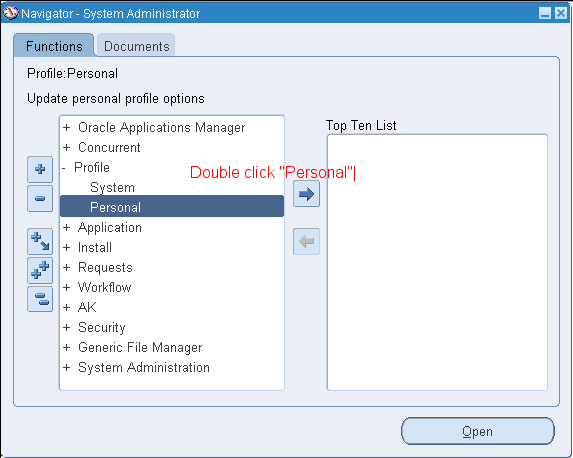
  • PERSONAL PROFILE:

Responsibility SYSTEM ADMINISTRATOR -->

To view personal profiles enter into the query mode and enter the profile name which we have already then we get profile value details.


To check the validation done against the Profile value while setting:


Responsibility APPLICATION DEVELOPER -->


Use of the API FND_PROFILE


It is used to perform various actions related to profile values through PL/SQL. Some of the important ones are listed below

1. FND_PROFILE.GET(‘Name of the Profile’, variable name);
Example
SELECT fnd_profile.value('PROFILEOPTION')
      ,fnd_profile.value('MFG_ORGANIZATION_ID')
      ,fnd_profile.value('ORG_ID')
      ,fnd_profile.value('LOGIN_ID')
      ,fnd_profile.value('USER_ID')
      ,fnd_profile.value('USERNAME')
      ,fnd_profile.value('CONCURRENT_REQUEST_ID')
      ,fnd_profile.value('GL_SET_OF_BKS_ID')
      ,fnd_profile.value('SO_ORGANIZATION_ID')
      ,fnd_profile.value('APPL_SHRT_NAME')
      ,fnd_profile.value('RESP_NAME')
      ,fnd_profile.value('RESP_ID')
  FROM DUAL;


2. variable name := FND_PROFILE.VALUE(‘Name of the profile’);
3. FND_PROFILE.PUT(‘Name of the profile’, value of the profile);

Example
SET SERVEROUTPUT ON;
DECLARE
   v_conc_login_id      NUMBER;
BEGIN
   FND_PROFILE.put ('CONC_LOGIN_ID',1425);
   fnd_profile.get ('CONC_LOGIN_ID', v_conc_login_id);
   DBMS_OUTPUT.put_line (v_conc_login_id);
END;
Output:
1425
PL/SQL procedure successfully completed

The 1st and 2nd are same but, the only difference is FND_PROFILE.GET is the procedure and FND_PROFILE.VALUE is the function so, it return a value.  

Apart from the above procedures we have another important one named FND_PROFILE.SAVE used to set the profile values from backend. A detail regarding this API is as below. 
 

Changing Profile Options from Backend

The table fnd_profile_options_tl, profile options names are kept.  Now find the corresponding the Profile option name for which you need to update from backend. For this example I took my favorite “ORG_ID”
 
SELECT profile_option_name
 FROM fnd_profile_options_tl
 WHERE user_profile_option_name LIKE 'MO%'


It returns more than one row but i can make out that "ORG_ID" is the PROFILE_OPTION_NAME for MO: Operating Unit. Now I need to know the Org_ID of the Org whose value is to be set in MO: Operating Unit. SO I use the simple select as below
SELECT organization_id, NAME
  FROM hr_all_organization_units;

From the organization name I find the one which will be the default Operating Unit, and I note the ID. In my case the ID for my default Operating Unit is 286. Now with the code below I set the profile option value using fnd_profile.save.

DECLARE
   stat   BOOLEAN;
BEGIN
   DBMS_OUTPUT.DISABLE;
   DBMS_OUTPUT.ENABLE (100000);
   stat := fnd_profile.SAVE ('ORG_ID', 286, 'SITE');
   IF stat
   THEN
      DBMS_OUTPUT.put_line ('Stat = TRUE - profile updated');
   ELSE
      DBMS_OUTPUT.put_line ('Stat = FALSE - profile NOT updated');
   END IF;
   COMMIT;
END;
 
 ***********************************************************************************


Sunday, August 5, 2012

Different Modes of Data guard Protection


Introduction

  • When using an Oracle standby database for Business Continuity purposes there are 3 possible modes of operation for determining how the data is sent from the primary (the database currently being used to support the business queries) database to the standby (failover database to be used upon invocation of business continuity) database.
There are 2 synchronous modes and 1 asynchronous mode.

The various modes of operation of a standby are a real trade-off between data protection and impact on the primary systems.


Modes of Operation

The following table shows the options giving the benefits and drawbacks.

Mode of Operation
SYNC/
ASYNC
Benefits
Drawbacks
Maximum Protection
SYNC
Never any data loss, no data ever accepted on primary
without being on standby.
Slower response times on primary. Network disruption
between primary and secondary causes downtime of primary database.
Maximum Availability
SYNC
Updates must be on standby before accepted on primary,
network disruption means the primary continues running with updates sent to
standby when it is available again.
Slower response times on primary. Data loss possible if
network fails and then site fails.
Maximum Performance
ASYNC
No performance slowdown for applications on primary.
Data loss will happen

  • The customer is currently running in Maximum Performance mode, and thus the standby solution has minimal impact on the response times of the various applications.
  • There are 2 factors that would impact the application response if they moved to a higher level of data protection, the network latency and the network bandwidth. During normal operation, the response time of applications that make data changes would be impacted by the round trip time (rtt) to their standby
  • During periods of high volume activity, the bandwidth can become congested and this could lead to significant delay in response time.


Conclusion

  • If a higher level of data protection was deemed a business requirement it is advised that you have a significantly larger network bandwidth to the Business Continuity site.
  • During normal running we typically see a transport lag (of data between the sites) of around 10 seconds and this would be the typical amount of data we would lose in a disaster situation. During high peaks of activity this can increase.
  • In determining to increase the protection mode of the configuration there is a real trade off between how much you value your data (for this customer it is a reputation issue as much as a financial consideration) and the impact on your normal day-to-day performance.

Monday, July 30, 2012

Virtual IP (VIP) in Oracle Real Application Clusters (RAC)


Use of Virtual IP (VIP) in Oracle Real Application Clusters (RAC)

When installing Oracle 10g/11g R1 RAC, three network interfaces (IPs) are required for each node in the RAC cluster, they are:
  • Public Interface:  Used for normal network communications to the node
  • Private Interface:  Used as the cluster interconnect
  • Virtual (Public) Interface: Used for failover and RAC management
When installing Oracle 11g R2 RAC, we need one more network interface (IP) for each node in the RAC cluster.
SCAN Interface (IP):  Single Client Access Name (SCAN) is a new feature in Oracle Real Application Clusters (RAC) 11g Release 2, which provides a single name for all clients to access an Oracle Database running in a cluster. The benefit of SCAN is clients using SCAN do not need to change if you add or remove nodes in the cluster.

  • When a client connects to a tns-alias, it uses a TCP connection to an IP address, defined in the tnsnames.ora file. When using RAC, we define multiple addresses in our tns-alias, to be able to failover when an IP address, listener or instance is unavailable. TCP timeouts can differ from platform to platform or implementation to implementation. This makes it difficult to predict the failover time. 
Oracle 10g Cluster Ready Services enables databases to use a Virtual IP address to configure the listener ON. This feature is to assure that oracle clients quickly failover when a node fails. In Oracle Database 10g RAC, the use of a virtual IP address to mask the individual IPO addresses of the clustered nodes is required. The virtual IP addresses are used to simplify failover and are automatically managed by CRS.

  • To create a Virtual IP (VIP) address, the Virtual IP Configuration Assistant (VIPCA) is called from the root.sh script of a RAC install, which then configures the virtual IP addresses for each node specified during the installation process. In order to be able to run VIPCA, we need unused public IP addresses available for each node that has been configured in the /etc/hosts file.
  • One public IP address for each node to use for its Virtual IP address for client connections and for connection failover. This IP address is in addition to the operating system managed public host IP address that is already assigned to the node by the operating system. This public Virtual IP must be associated with the same interface name on every node that is a part of the cluster. The IP addresses that are used for all of the nodes that are part of a cluster must be from the same subnet. The host names for the VIP addresses must be registered with the domain name server (DNS). The Virtual IP address should not be in use at the time of the installation because this is a Virtual IP address that Oracle manages internally to the RAC processes. This virtual IP address does not require a separate NIC. The VIPs should be registered in the DNS. The VIP addresses must be on the same subnet as the public host network addresses. Each Virtual IP (VIP) configured requires an unused and resolvable IP address.
  • Using virtual IP we can save our TCP/IP timeout problem because Oracle notification service (ONS) maintains communication between each nodes and listeners. Once ONS found any listener down or node down, it will notify another nodes and listeners. While new connection is trying to establish connection to failure node or listener, virtual IP of failure node automatically divert to surviving node and session will be establishing in another surviving node. This process doesn't wait for TCP/IP timeout event. Due to this, new connection gets faster session establishment to another surviving nodes/listener.
  • Virtual IP (VIP) is for fast connection establishment in failover dictation. Still we can use physical IP address in Oracle 10g in listener if we have no worry for failover timing. We can change default TCP/IP timeout using operating system utilities/commands and kept smaller. But taking advantage of VIP (Virtual IP address) in Oracle 10g RAC database is advisable.

Sunday, July 29, 2012

Locally vs Dictionary Managed Tablespaces

When Oracle allocates space to a segment (like a table or index), a group of contiguous free blocks, called an extent, is added to the segment. Metadata regarding extent allocation and unallocated extents are either stored in the data dictionary, or in the tablespace itself.

Tablespaces that record extent allocation in the dictionary, are called dictionary managed tablespaces, and

Tablespaces that record extent allocation in the tablespace header, are called locally managed tablespaces.


DEV> select tablespace_name, extent_management, allocation_type from dba_tablespaces;

TABLESPACE_NAME       EXTENT_MAN        ALLOCATION
------------------------------     ----------------------       --------------------
SYSTEM                           DICTIONARY           USER
SYSAUX                          LOCAL                      SYSTEM
UNDOTBS1                      LOCAL                      SYSTEM
TEMP                               LOCAL                      UNIFORM
ABMD                              LOCAL                      USER
ESSO                                LOCAL                     USER
SIT                                   LOCAL                     USER
USERS                             LOCAL                     UNIFORM
USER_DATA                    LOCAL                     UNIFORM


Friday, June 29, 2012

Oracle Applications Idle Session Timeout

What is Session Idle time?

If Oracle Apps client is idle for some time (Eg. Application user goes for a coffee break) session during that time is called as Idle Session & because of security reason, performance issues and to free up system resource Oracle Applications terminates client session (both forms & self service) after idle time value is reached to the one mentioned in configuration file.

To enter into application, profile option "ICX Session Timeout" is used.

ICX Session Time out mentioned in profile option ICX: Session Timeout is in minutes, so ICX session timeout=30

From where ICX: Session Timeout & session.timeout get values?

Autoconfig determines value for profile option "ICX: Session Timeout" and "session.timeout" from entry in context file ($APPL_TOP/admin/SID_hostname.xml) with parameter s_sesstimeout where value mentioned is in milliseconds so profile option ICX: Session Timeout value should be s_sesstimeout/ (1000 * 60) which means here its 10 Minutes. This value is also set in zone.properties in $IAS_ORACLE_HOME/Apache/Jserv where number mentioned is in milli second i.e. 600000 (equal to 10 Minutes) session.timeout = 600000.

Eg.  Session Timeout is in minutes, so ICX session timeout=480 is 8Hrs.


Wednesday, June 6, 2012

Drop Tablespace and Datafiles associated with it.

1. Ouery to Drop a Tablespace.


SQL> DROP TABLESPACE users INCLUDING CONTENTS;


2.Query To delete the tablespace & datafiles associated with a tablespace


SQl> DROP TABLESPACE users INCLUDING CONTENTS AND DATAFILES;


Oracle Docs Link For reference:

http://docs.oracle.com/cd/B28359_01/server.111/b28310/tspaces009.htm


Location for Apache Log File &Apache Errors

Apache Logfile Location: "$IAS_ORACLE_HOME/Apache/Apache/logs/"

check for the errors in Apache log file.

Some Important HTTP Status Codes:
  • 200 OK
  • 201 Created
  • 202 Accepted
  • 400 Bad Request
  • 401 Unauthorized
  • 402 Payment Required
  • 403 Forbidden
  • 404 Not Found
  • 405 Method Not Allowed
  • 406 Not Acceptable
  • 407 Proxy Authentication Required
  • 408 Request Timeout
  • 409 Conflict
  • 424 Locked
  • 500 Internal Server Error
  • 501 Not Implemented
  • 502 Bad Gateway
  • 503 Service Unavailable
  • 504 Gateway Timeout
  • 505 HTTP Version Not Supported
  • 507 Insufficient Storage

Use the following programs to verify the installation and check that the servlets are functioning.

1. http//:/servlets/IsItWorking (11.5.10) This may fail with:

403 Forbidden You don't have permission to access /servlets/IsItWorking on this server.

This is due to enhanced security delivered with the autoconfig templates..


2. http://:/servlets/Hello

If this fails, this indicates an issue with your Jserv set-up.
You then need to follow Note:230688.1


3. Validate the jsp pages

http(s)://:/OA_HTML/jsp/fnd/aoljtest.jsp

If this fails , this indicates an issue with your Jserv set-up. You then need to follow Note:230688.1
Check that the CGI environment and mod_plsql is functioning.


4. If you are unable to run the procedure below because of an 'internal error' or a 'cannot find host' or a similar error, then it could indicate that there is a problem with the PLSQL Configuration.

a. Run the following URL:   http://:/pls//FND_WEB.PING

For example:

http://myHost.myDomain.com:2002/pls/SID/FND_WEB.PING

This should output the results of running FND_WEB.PING package